
Conversational AI can hand your team 30 campaign ideas in under a minute.
Deciding which one is worth the budget, time, and effort to execute takes longer. When every option sounds polished, you need clear creative direction to choose the ones that fit your brand and give your audience a reason to care.
Effective conversational AI for marketing teams starts with knowing where it belongs in your workflow. These five steps will help your team explore ideas with AI and turn the strongest ones into on-brand creative.
What is conversational AI for marketing teams?
Conversational AI for marketing teams means using AI tools through prompts and follow-up questions to develop ideas, test messaging, and refine creative. A marketer might use ChatGPT, Claude, or Gemini to:
- Explore campaign angles from a brief
- Rework a suggestion after explaining why it feels off-brand
- Develop alternatives within an approved direction
That back-and-forth gives your team room to explore. Your people still set the direction and decide what’s ready for production.
1. Start with your team’s ideas
Let your team come up with its own starting ideas before AI joins the conversation. Rough observations and half-formed concepts count.
An April 2026 preprint by Alwin de Rooij and Michael Mose Biskjaer reviewed 19 studies. It found a small but statistically significant drop in the variety of people’s ideas when they created with AI. The effect depended on the task: AI-assisted ideas were more alike when people worked on a specific problem than when they explored freely.
Research summarized in MIT Sloan Management Review also suggests that keeping people responsible for early ideation can help preserve creative variety.
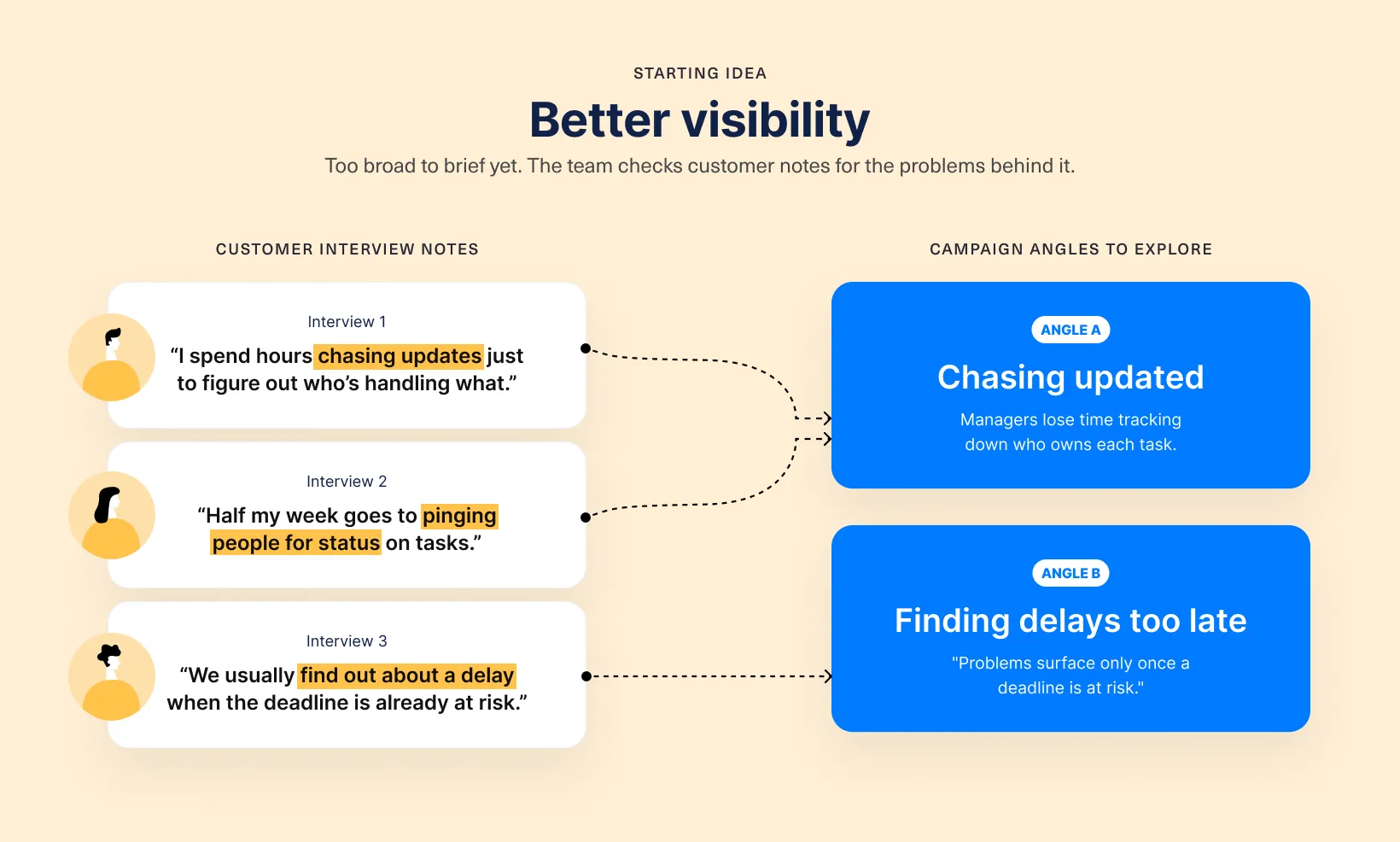
To see how this plays out, picture a team marketing project management software to operations managers. The product shows who owns each task and where work gets stuck, and the team’s starting idea is “better visibility.”
Before opening an AI tool, they go through customer interview notes and list the problems the campaign could tackle. Maybe managers waste time chasing updates. Or they only find out about delays once a deadline is already at risk.
Design Force tip: Have everyone in the team write down one campaign angle before the group discussion or any AI session. Keep those notes, so you can tell later whether AI added a new perspective or just repeated yours.
2. Give AI useful brand context
Confirm the campaign objective, the audience, and what the business can credibly promise. Then put that into your prompt: positioning, product details, the task itself, approved language examples, and any restrictions.
Brand pillars turn vague preferences into usable direction. “Make complex work understandable” tells AI far more than “sound professional.”
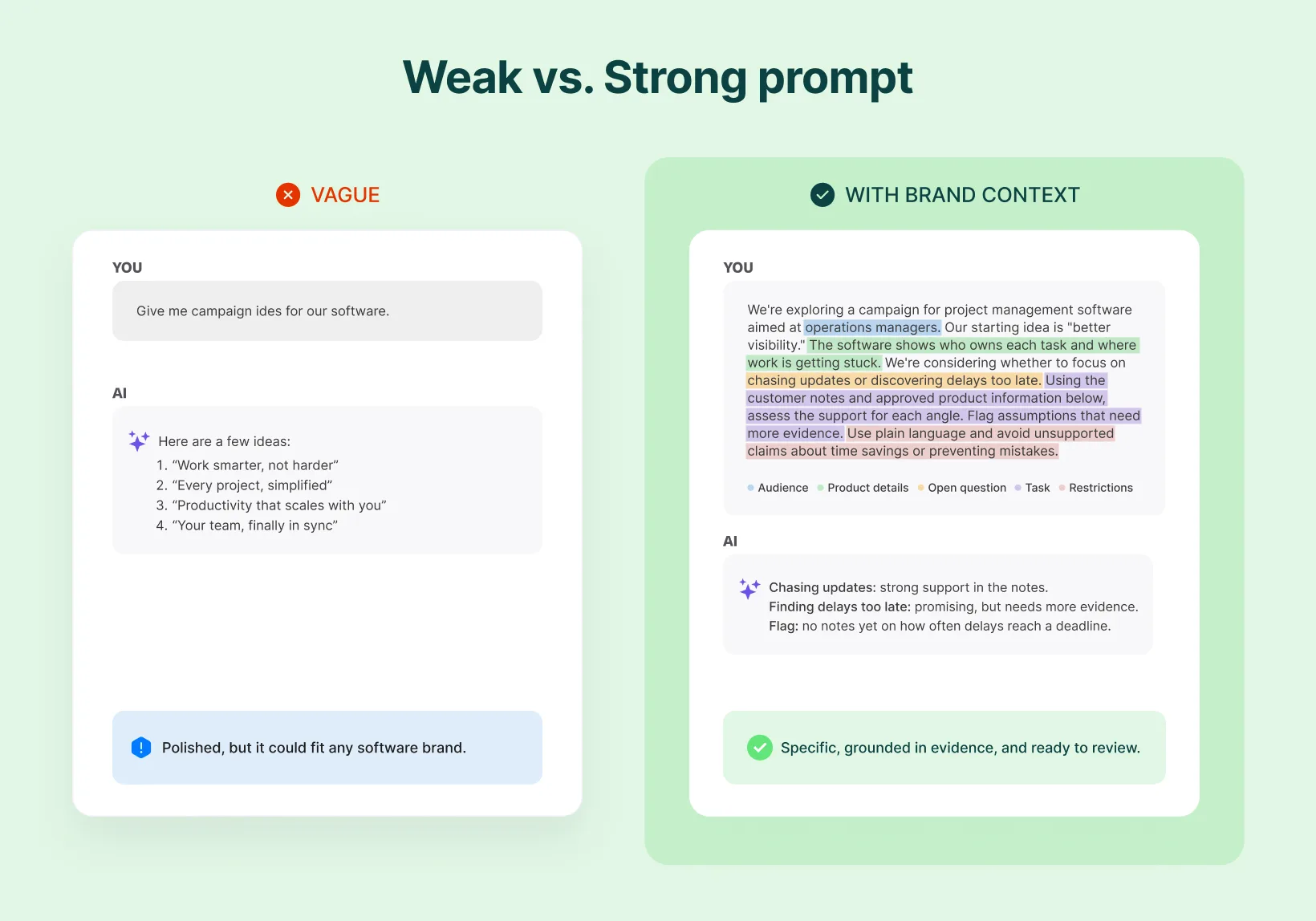
For the software team, that means sharing the customer notes behind “better visibility,” explaining what the product actually does, and saying they haven’t picked a customer problem yet. Compare “Give me campaign ideas for our software” with this:
Approved examples show your brand’s voice better than a list of adjectives. In Typeform’s 2026 report, 91% of marketers said they occasionally or often edit AI-generated copy to make it sound more human, even when it’s accurate. Brand context gives that editing a clearer starting point.
Design Force tip: Include an approved copy example and explain why it works. “This headline names the customer’s problem without exaggerating it” gives AI more useful direction than “match our tone.”
3. Use AI to challenge and develop your ideas
Once AI has context, give it a specific job. Ask it to poke holes before you ask for finished copy.
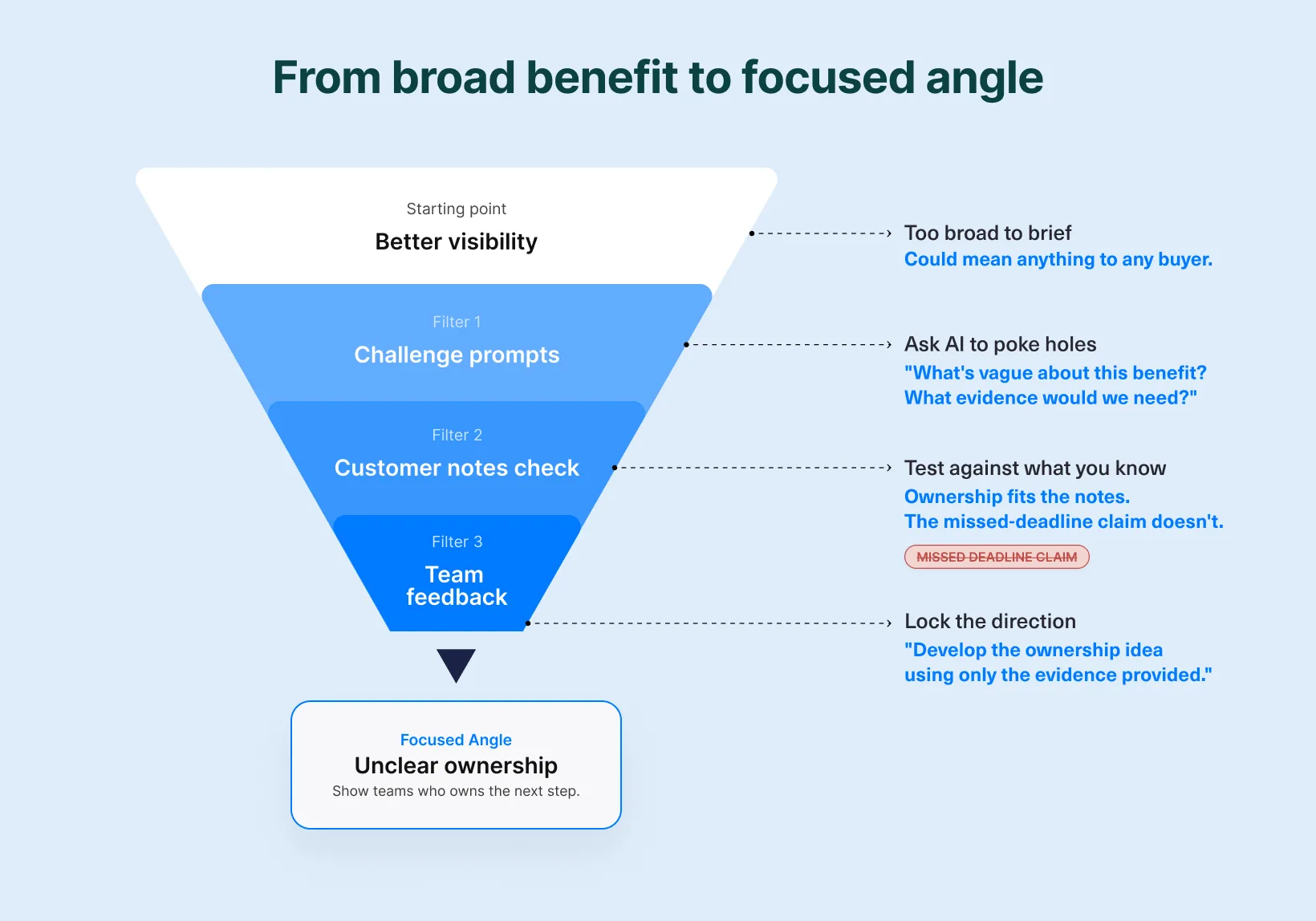
“Better visibility” is still a broad benefit, so the software team uses AI to test the two possible problems against their notes:
- “What’s vague about this benefit? What would we need to explain?”
- “Using the customer notes below, suggest three situations where limited visibility creates a problem. Link each one to the notes.”
- “Suggest a campaign angle focused on unclear ownership. What evidence would we need to support it?”
Check every answer against what you know about your customers. AI might raise a useful question, but only your team can confirm the problem matters to buyers.
Then give specific feedback:
The ownership angle fits our customer notes, but the missed-deadline claim goes beyond them. Develop the ownership idea using only the evidence provided.
Carry each decision into the next prompt. Once the direction is approved, ask for headlines about how the product helps teams see who owns the next step.
Design Force tip: If the options all sound alike during exploration, ask AI to tackle a different customer problem. Once a direction is approved, lock the benefit and explore new ways to say it.
4. Review ideas before developing assets
In Ahrefs’ September 2026 survey, 66% of marketers said they trust AI-generated written content only after human review. Give that review clear criteria:
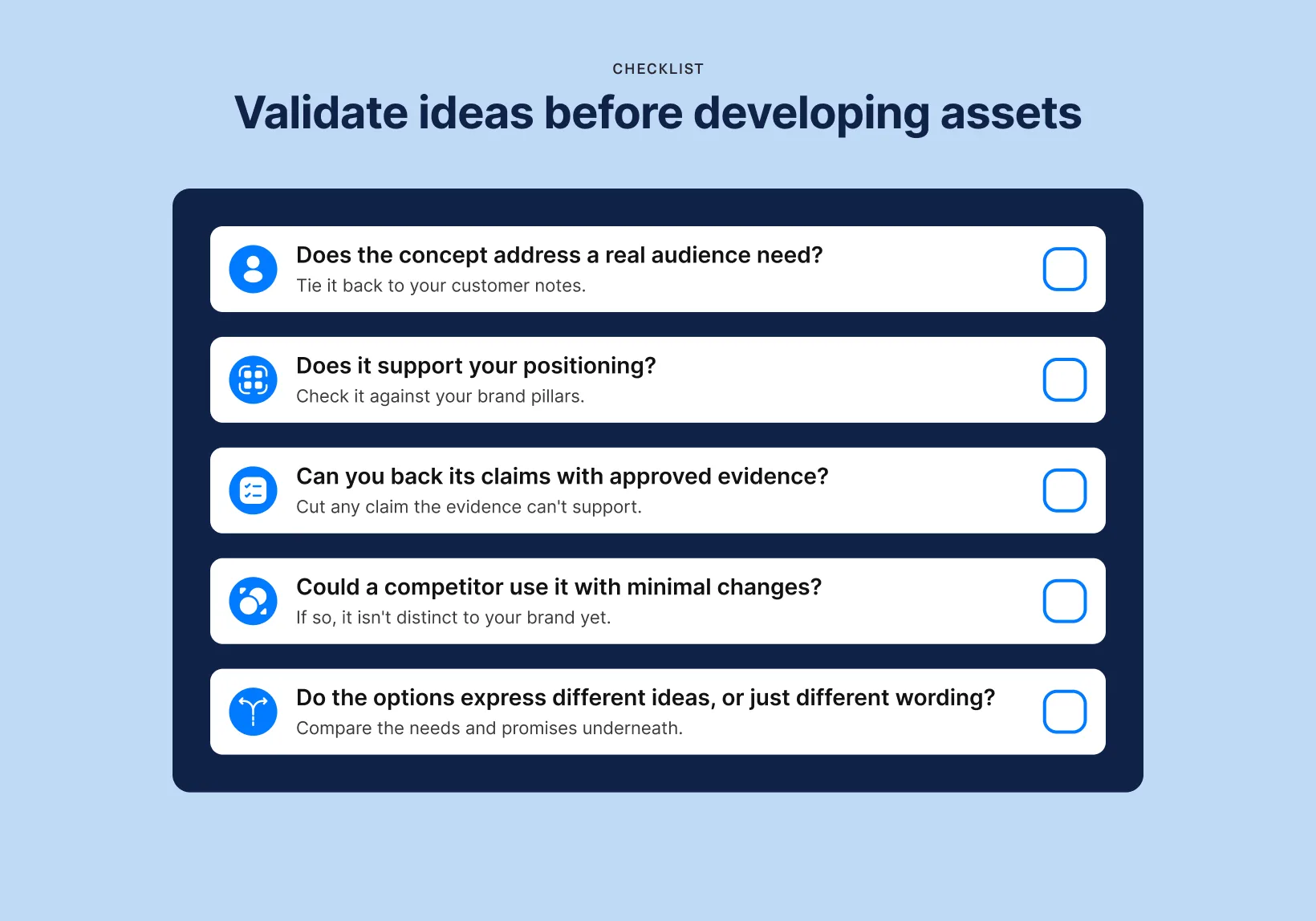
Five polished headlines can all make the same argument. Compare the needs and promises underneath before deciding you have real variety.
Then consolidate feedback and settle conflicting requests before the next round. Explain what’s wrong and why. “This headline implies we prevent all missed updates, which the product can’t guarantee” gives the team a clear fix.
Design Force tip: End every review with a decision: approve, revise, or stop. Write down what happens next, so settled questions stay settled.
5. Turn the approved direction into cohesive assets
Capture the selected direction in a clear design brief. Cover who it’s for, the problem it solves, why you picked it, the evidence behind it, and how it should look. Add your brand guidelines and a list of assets to create.
For our software campaign, the handoff could look like this:
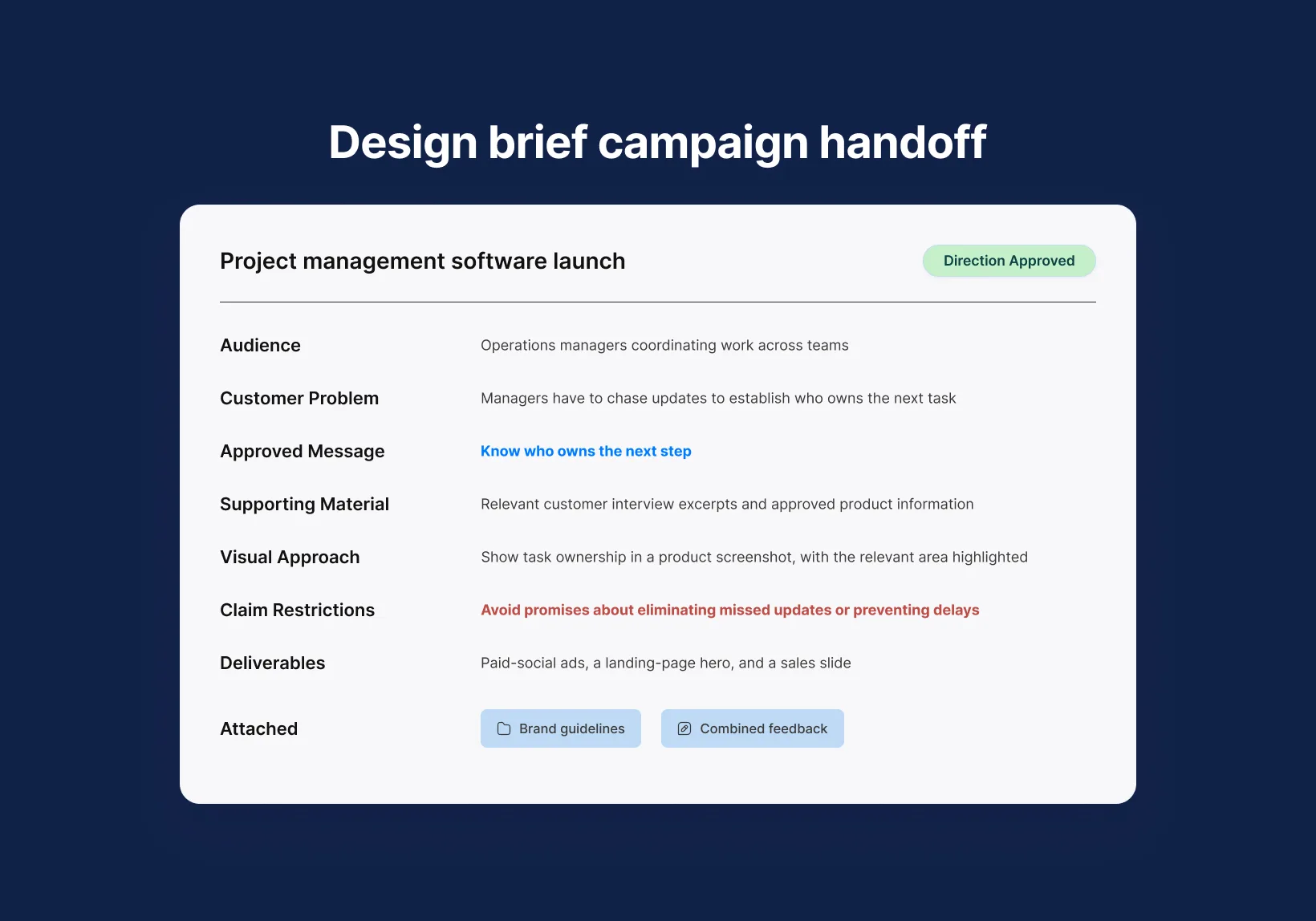
Here’s how our software campaign’s approved direction could translate across three placements. Each asset focuses on clear task ownership, with the layout adapted to how someone encounters the message.
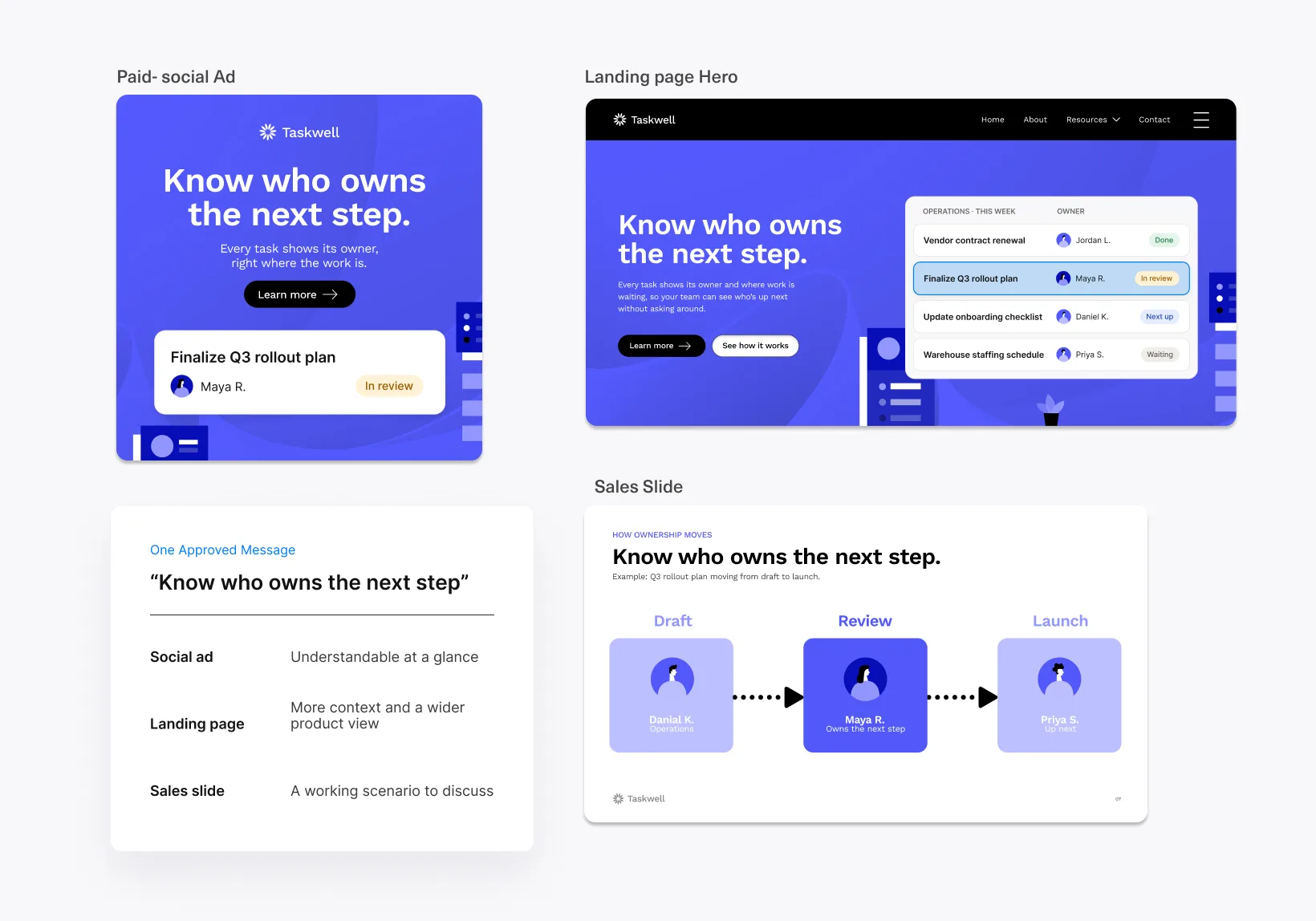
Review the finished assets together
An AI creative workflow needs asset-level review before delivery. Run through this QC checklist:
- Factual accuracy: Verify claims and product details against approved sources.
- Readability: Check text size, spacing, and hierarchy at the intended viewing size.
- Production specifications: Confirm dimensions, file formats, and file sizes for each placement.
- Accessibility: Apply inclusive web design principles, including sufficient contrast and meaningful alt text.
- Brand consistency: Check typography, colors, imagery, and tone against your brand guidelines.
- Message alignment: Make sure the copy and visuals communicate the approved campaign idea.
- Channel fit: Adapt each asset to its placement instead of simply resizing it.
- Visual quality: Inspect for distorted images, awkward crops, and stray design elements.
- Copy and functionality: Proofread the final text and test links, buttons, and QR codes where applicable.
- Final approval: Confirm that feedback has been resolved and the correct versions are ready for delivery.
Keep creative judgment at the center
AI is good at generating variations. Knowing which one deserves more attention requires understanding your audience and what your brand can credibly say.
That judgment has to carry through to the final asset, because a strong idea can get lost in a crowded layout or a visual that tells a different story. Keep people shaping the work from the first concept to the last quality check.
Ready to bring your campaign direction to life?
Design Force executes your approved idea and carries it through creative production, with creative judgment guiding how it takes shape across formats. Working from your brief and brand guidelines, our team develops assets that keep the campaign’s message clear wherever it appears.
Book a call to discuss your next campaign or ongoing creative production needs.